Generate e-invoices with PolyDoc
Introduction
Use this guide to generate hybrid invoices that remain readable as normal PDFs while embedding structured invoice XML for accounting and ERP processing.
New to the standards? Start with ZUGFeRD vs Factur-X vs XRechnung vs Peppol to work out which format you need. PolyDoc produces the Factur-X / ZUGFeRD hybrid PDF.
Prerequisites
- A PolyDoc account and API key. Sign up for free, no credit card required. The free plan includes 150 PDF conversions per month.
- Invoice data available in your app/backend (seller, buyer, line items, totals) that can be sent as JSON.
Configuration
Choose standard
Set
eInvoice.standard to choose the e-invoice labeling convention:facturx- recommended for France and many cross-border EU scenarioszugferd- common in German domestic invoicing
Both generate equivalent hybrid invoices and use the same underlying CII XML model.
Choose profile
Set
eInvoice.profile to control compliance depth. en16931 is the recommended default for standard EU B2B invoicing.| Profile | Typical usage |
|---|---|
minimum | Minimal payment information, no line-item detail. |
basicwl | Basic payment data without line items. |
basic | Line items included, no allowances or charges. |
en16931 | Standard EU B2B compliance profile. |
extended | Additional fields for complex or custom invoicing scenarios. |
Provide invoice payload
The
eInvoice.invoice object contains your structured business data. Typical required fields include:- Header fields:
number,issueDate,currencyCode - Parties:
sellerandbuyerwith address data - Lines:
lines[]with quantity, unit price, VAT details - Totals:
totalNetAmount,totalTaxAmount,totalGrossAmount
Optional verification
Set
eInvoice.verify to true to require PDF/A-3b compliance after assembly: if VeraPDF reports non-compliance, the API returns 422 Unprocessable Entity with code: "PDFA_VERIFICATION_FAILED" (and a pdfa object with details). On success you receive a normal 200 response with the PDF body.With
verify omitted or false on eInvoice, the hybrid invoice is returned without enforcing a passing VeraPDF check.{
"source": "<html><body><h1>Invoice INV-2026-042</h1></body></html>",
"eInvoice": {
"standard": "facturx",
"profile": "en16931",
"verify": true,
"invoice": { "...": "..." }
}
}
Compliance behavior
E-invoice conversion creates a hybrid output: human-readable PDF plus machine-readable invoice XML (Factur-X or ZUGFeRD), aligned with the selected profile and invoice payload.
The invoice template
Your
source can be your own HTML (as in the examples above) or a template you saved in the dashboard, referenced as [template:xxx-yyy]. The fastest way to a compliant, well-designed invoice is the built-in E-Invoice template.- Self-contained: no external fonts, scripts, or network requests at render time.
- Ships with a statutory footer imprint (seller, VAT, commercial register, IBAN/BIC) in a three-column layout.
- Reads the same invoice object that becomes the embedded XML, so the page and the XML stay in sync.
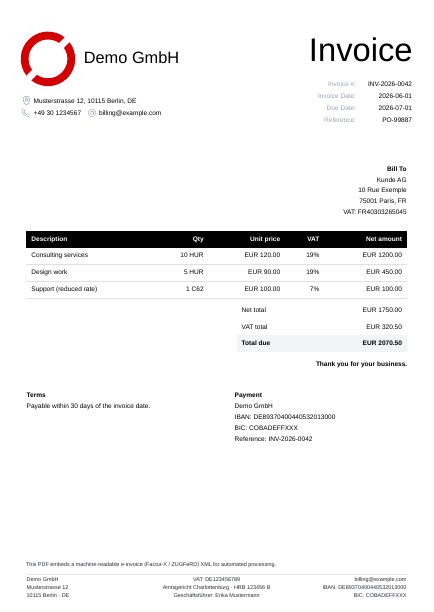
Sample output. Click to open the full PDF.
How your invoice data reaches the page
Put your invoice data in
eInvoice.invoice. That one object drives two things at once: the embedded machine-readable XML and the visible page. On a conversion that includes an eInvoice payload it also replaces any templateData.invoice, so the human-readable PDF and the XML can never disagree.- Change the data: edit
eInvoice.invoice. It flows to both the XML and the page. - Change the look: edit the template's HTML and CSS.
- Values you nest under
templateData.invoiceare ignored on a real e-invoice call. They only appear in the dashboard preview, which sends noeInvoice.
Some legal details are not part of the invoice schema: the commercial register entry, the court, share capital, and the managing director. Keep these in a sibling
templateData.company object. It sits next to invoice (not inside it), so it survives the merge. The built-in template reads company.registration, company.management, and company.capital for its footer. For France, use the RCS entry and a "Capital social" line.{
"source": "[template:xxx-yyy]",
"eInvoice": {
"standard": "facturx",
"profile": "en16931",
"invoice": {
"number": "INV-2026-042",
"issueDate": "2026-03-15",
"dueDate": "2026-04-14",
"currencyCode": "EUR",
"seller": { "name": "Acme GmbH" },
"totalGrossAmount": 1428.00,
"...": "..."
}
},
"templateData": {
"company": {
"registration": "Amtsgericht Charlottenburg, HRB 123456 B",
"management": "Geschäftsführer: Erika Mustermann"
}
}
}
Inside the template, every top-level key of
templateData is a Liquid variable. On a real call your eInvoice.invoice takes the place of templateData.invoice, so you read invoice fields as {{ invoice.* }} and the static legal details as {{ company.* }}. The same template renders in the dashboard preview (from its sample templateData.invoice) and on a live call (from eInvoice.invoice).<!-- Invoice data: from eInvoice.invoice on a real call -->
<h1>Invoice {{ invoice.number }}</h1>
<p>Issued {{ invoice.issueDate }} · Due {{ invoice.dueDate }}</p>
{% for line in invoice.lines %}
<tr>
<td>{{ line.description }}</td>
<td>{{ line.quantity }} × {{ line.unitPrice }} {{ invoice.currencyCode }}</td>
</tr>
{% endfor %}
<p>Total due: {{ invoice.totalGrossAmount }} {{ invoice.currencyCode }}</p>
<!-- Static legal details: from templateData.company -->
<footer>
{{ invoice.seller.name }} · {{ company.registration }}
{{ company.management }}
</footer>
Start from the built-in template
- In the dashboard, open the Templates page and find the E-Invoice default. Click Duplicate. Default templates are read-only and cannot be referenced in API calls, so you work from your own copy, which gets a stable short ID.
- Customize the copy: the body, the native header and footer (your logo and statutory imprint), the styles, and the sample data. For the editor itself (content, header, footer, CSS, and default options tabs), see the templates guide.
- Reference your copy's short ID in
sourceand send youreInvoicepayload. Set your fixed legal details once in the copy'stemplateData.companysample data so every call reuses them; you can still override them per request.
Example request
{
  "source": "<html><body><h1>Invoice INV-2026-042</h1></body></html>",
  "eInvoice": {
    "standard": "facturx",
    "profile": "en16931",
    "verify": true,
    "invoice": {
      "number": "INV-2026-042",
      "issueDate": "2026-03-15",
      "dueDate": "2026-04-14",
      "currencyCode": "EUR",
      "seller": {
        "name": "Acme GmbH",
        "address": {
          "line1": "Hauptstrasse 1",
          "city": "Berlin",
          "postalCode": "10115",
          "countryCode": "DE"
        },
        "taxId": "DE123456789"
      },
      "buyer": {
        "name": "Customer AG",
        "address": {
          "line1": "Rue du Parc 5",
          "city": "Paris",
          "postalCode": "75008",
          "countryCode": "FR"
        },
        "taxId": "FR98765432100"
      },
      "lines": [
        {
          "description": "Consulting services (8 h)",
          "quantity": 8,
          "unitCode": "HUR",
          "unitPrice": 150.00,
          "lineTotal": 1200.00,
          "vatRate": 19.0,
          "vatCategoryCode": "S"
        }
      ],
      "totalNetAmount": 1200.00,
      "totalTaxAmount": 228.00,
      "totalGrossAmount": 1428.00
    }
  }
}
Tips
Next steps
- Which standard do I need? ZUGFeRD vs Factur-X vs XRechnung vs Peppol.
- The standard underneath: EN 16931 explained.
- For dedicated e-invoicing: this feature covers the Factur-X / ZUGFeRD hybrid PDF. If e-invoicing is your primary need, beliq is our dedicated e-invoicing product: more formats (XRechnung, Peppol BIS, UBL), validation against EN 16931 and country rules, and it keeps pace with standard changes.
- New to PolyDoc? Create a free account, 150 conversions per month, no credit card.